
Microsoft PowerToys Features
A complete breakdown of every utility in the PowerToys suite. From process inspection and system monitoring to advanced permissions, performance insights, and plugin support.
Process Inspection
File Locksmith
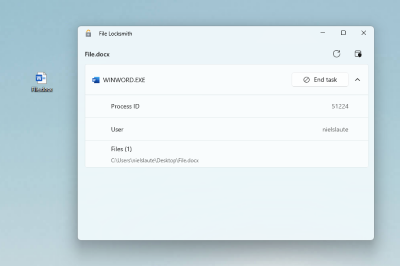
Check which files are in use and by which processes directly from the File Explorer context menu. When you cannot delete, move, or overwrite a file, File Locksmith shows exactly which process holds the lock and lets you end that process. This provides targeted process inspection without needing a full task manager alternative like Process Hacker.
- ✓ Right-click any file in Explorer to inspect locks
- ✓ View process name and PID for each lock holder
- ✓ End blocking processes without opening Task Manager
System Monitoring
Awake
Keep a computer awake without managing power and sleep settings. Ideal for long builds, presentations, downloads, or remote sessions where system sleep would interrupt critical work.
Power Display
Control external monitor brightness, contrast, volume, input source, and color temperature from a single flyout. A focused system monitor for display hardware without third-party tools.
Light Switch
Automatically switch between light and dark themes based on time of day. Reduces eye strain and aligns your desktop appearance with your work schedule.
For deeper hardware monitoring such as CPU temperature and voltage, dedicated system monitor tools remain useful alongside PowerToys. See our Guides for best practices.
Advanced Permissions & System Access
Environment Variables
Manage environment variables with profiles to group variables together. Switch between development, staging, and production configurations instantly without editing system settings manually each time.
Hosts File Editor
Edit the Windows Hosts file containing domain names and IP address mappings. Useful for local development, blocking domains, or testing before DNS changes propagate.
Registry Preview
Visualize and edit Windows Registry files before applying changes. Provides a safer workflow for registry modifications with a clear preview of all keys and values.
Always On Top
Pin windows above other windows with a quick key shortcut. Essential for reference documentation, monitoring dashboards, or video calls while working in other applications.
Mouse Without Borders
Control multiple computers with a single keyboard and mouse. Seamlessly move your cursor across machines on the same network, with clipboard sharing between systems.
Performance Insights & Productivity
FancyZones
A window manager for creating complex window layouts and positioning windows quickly. Define custom zone templates for ultrawide monitors, dual displays, or laptop plus external screen setups. Drag windows into zones with Shift held for instant layout application.
Setup guide for FancyZones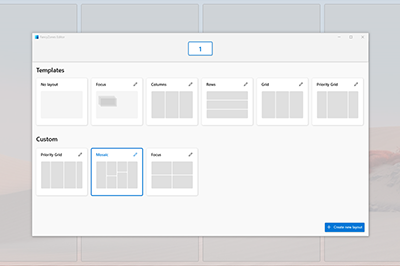
PowerToys Run
Search and open apps, files, folders, and run system commands instantly. Acts as a powerful task manager alternative for launching and switching between applications faster than the Start menu. Supports calculator, unit conversion, and deep system integration.
PowerToys Run tips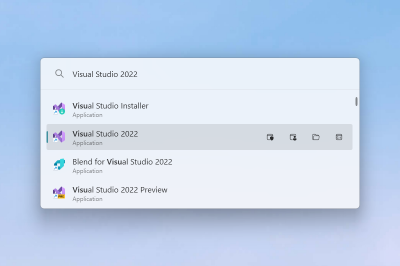
PowerRename
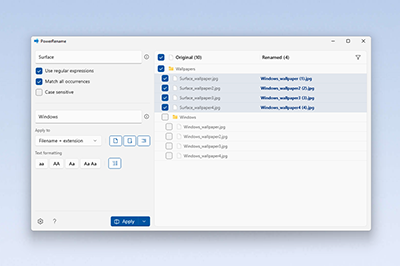
Perform bulk renaming with search and replace, regular expressions, and full undo support. Preview all changes before applying. Handles hundreds of files in seconds for photography, development, and media workflows.
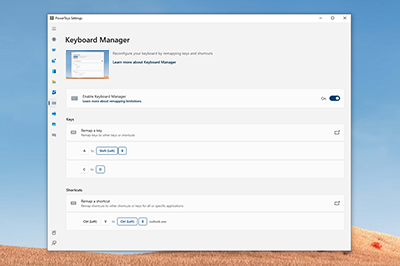
Keyboard Manager
Customize the keyboard by remapping keys and creating custom shortcuts. Remap individual keys, key combinations, or shortcut sequences. Supports per-app remapping for application-specific layouts.
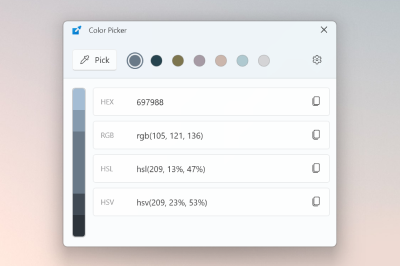
Color Picker
A system-wide color picking utility. Pick colors from anywhere on the screen and copy values in HEX, RGB, HSL, or other formats. Essential for designers and developers matching UI colors across applications.
Plugin Support & Extensibility
PowerToys Run Plugins
PowerToys Run supports a plugin architecture that extends its capabilities. Community and official plugins add web search, clipboard history, window switching, and custom command execution. The plugin system makes PowerToys Run comparable to dedicated launcher applications while remaining integrated with Windows.
Installing and managing pluginsCommand Palette
Access frequently used commands, apps, and tools from a single, fast, customizable interface. Command Palette centralizes actions across PowerToys utilities and integrates with your workflow for quick access to any enabled module.
Command Palette guideAdditional Utilities
Advanced Paste
Paste clipboard text into any format needed, with optional AI-powered transformation.
Text Extractor
Copy text from anywhere on your screen using OCR technology.
Peek
Preview file content without opening applications or interrupting your workflow.
Workspaces
Launch a set of applications to custom positions with a single click.
Image Resizer
Quickly resize images with a right-click in File Explorer.
File Explorer Add-ons
Enable Preview pane and thumbnail rendering for SVG, PDF, QOI, STL, and more.
Mouse Utilities
Find My Mouse, Highlighter, Jump, and Crosshairs for presentations and accessibility.
Screen Ruler
Quickly measure pixels on your screen based on image edge detection.
Shortcut Guide
Display available Windows key shortcuts for the current desktop state.
ZoomIt
Screen zoom, annotation, and recording tool for technical presentations.
Crop And Lock
Create a cropped or thumbnail window of another window that stays interactive.
New+
Create files and folders from a personalized set of templates in File Explorer.
Related Resources
Download PowerToys
Get version 0.99.1 with SHA256 verification for Windows 10 and 11.
FancyZones Setup Guide
Step-by-step instructions for creating custom window layouts.
PowerToys FAQ
Safety, legality, Windows support, and installation questions answered.
Trust and Security
Open-source transparency and download integrity verification.
Get All Features in One Download
Install Microsoft PowerToys and enable only the utilities you need. Each module can be toggled independently.
Download PowerToys